The Login Request You Should Never Approve
It is 10:40 on a Tuesday night. Your office manager is on the couch with the TV on. Her phone buzzes: Approve sign-in? She did not try to sign in to anything, so she taps Deny. Thirty seconds later it buzzes again. Then again. By the twelfth buzz she is tired, a little annoyed, and half convinced the system is glitching. She taps Approve just to make it stop.
That is the entire attack. No malware. No clever code. Somebody already had her password, and they simply outlasted her.
It has a name, and it is worth knowing: MFA fatigue, sometimes called push bombing. Microsoft counted roughly 382,000 of these attacks in a single twelve-month stretch. About one percent of them ended with somebody tapping Approve. One percent sounds like nothing until you run the math on 382,000.
How the attack actually works
Multi-factor authentication is the second step you added so a stolen password alone would not be enough. Usually that second step is a push notification: your phone asks if the login is really you, and you tap yes or no.
Attackers cannot break that. So they do not try. Instead they take a password they already stole and hammer the login button over and over, which sends a fresh approval request to your employee’s phone every time. Fifteen requests. Forty requests. Requests at two in the morning. They are not trying to trick your technology. They are trying to exhaust a human being.
Where the password came from in the first place
This is the part owners miss. A push bombing attack means someone already has a working password for your business. It came from a phishing email, a reused password exposed in somebody else’s breach, or malware that quietly scraped the logins saved in a browser. I wrote about that last one recently in Saved Passwords: The Easiest Way Into Your Business, and it is the most common source I see in real cases.
So a stray approval prompt is never just an annoyance. It is a smoke alarm.
Why it works on good employees
I want to be clear about something, because owners get angry at the wrong person after this happens. The employee who taps Approve is not careless. She is a normal person being interrupted at home, repeatedly, by a system she was told to trust.
Nobody trained her on what a burst of unexpected prompts means. Nobody told her who to call at 10:40 at night. The prompt does not say somebody in another country is using your password right now. It just says Approve sign-in? — the same friendly message she taps yes to every morning.
That gap is a training problem, not a character problem, and it is fixable in about twenty minutes. Our security awareness training for business covers exactly this scenario, because it is the one that keeps landing.
What it costs when it works
Once an attacker is inside a legitimate account, most of your defenses stop seeing them as an attacker. They are logged in. They read email. They watch how your invoices get paid. They find your file storage and your payroll system.
The famous version of this was Uber, where a contractor got about forty prompts in thirty minutes, finally approved one, and handed over the keys to internal systems. But this is not a big-company problem that trickles down. The same playbook was run against a major retailer, and the attackers finished by deploying ransomware across roughly a thousand store locations. Nothing about the technique requires a large target. It requires one tired person with a phone.
What you can do this week
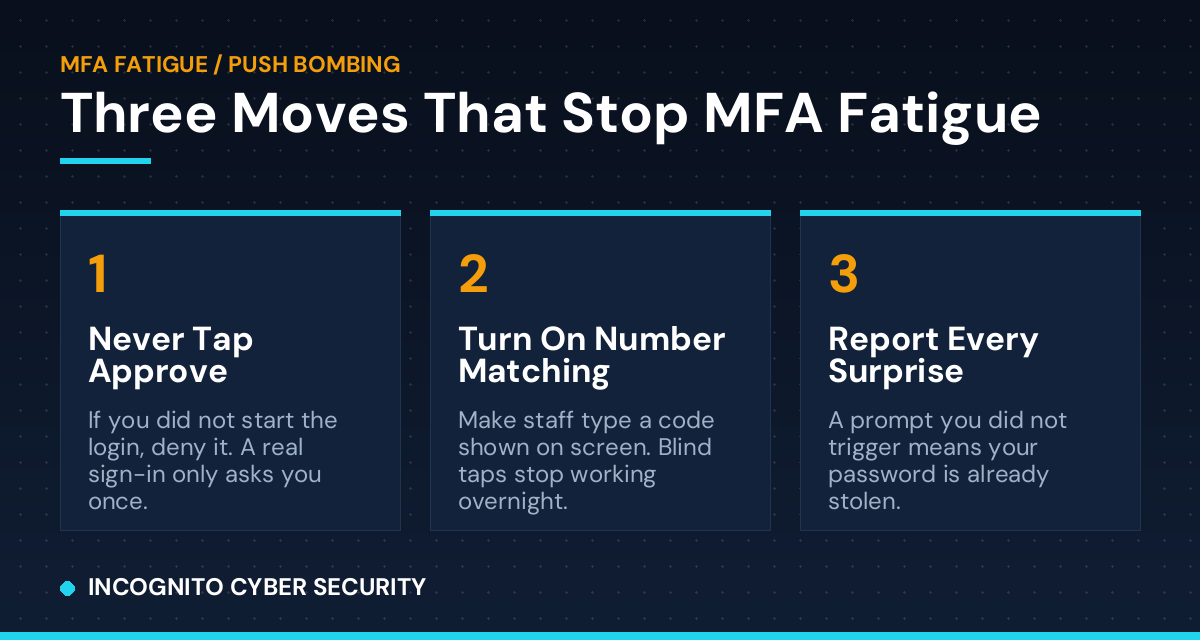
- Turn on number matching. Instead of a yes/no tap, the login screen shows a two-digit number and your employee has to type it into the phone. A blind tap no longer works, because the attacker’s screen is not in front of your employee. CISA specifically recommends this if you cannot move to stronger MFA yet. In Microsoft 365 and Google Workspace this is a setting, not a purchase.
- Give your team one sentence to remember. If a prompt shows up and you did not just try to log in, deny it and tell someone. That is the whole rule. Say it at your next staff meeting and put it in writing.
- Treat every surprise prompt as a stolen password. Do not just deny it and move on. That password is burned. Change it that day, everywhere it was reused.
- Make sure someone answers at 10:40 at night. Your team needs a number to call when this happens after hours. If you do not have one, that is precisely what our small business security service and 24/7 emergency line exist for.
- Shorten the path to the password. Fewer stolen passwords means fewer of these attacks. Good spam and virus filtering stops the phishing email, and endpoint protection stops the malware that harvests saved logins.
One more, less urgent but worth planning: if the worst happens and someone does get in, tested secure data backups are the difference between a bad week and a closed business.
The bottom line
MFA is still worth having. It stops the overwhelming majority of attacks, and I would never tell a client to turn it off. But the version most small businesses are running — tap yes, tap no — was designed for convenience, and attackers found the seam.
Switching on number matching costs you nothing but a few minutes in a settings menu. Telling your team the one-sentence rule costs you nothing at all. Between those two, you close a door that a lot of businesses are leaving wide open.
If you are not sure what your MFA is set to right now, that is a fair answer, and it is a quick thing to check. More practical write-ups like this one are on our blog.
Not sure how your MFA is configured?
We will look at your Microsoft 365 or Google Workspace setup, tell you plainly whether you are exposed to this, and show you what to change. No charge, no pressure.
Send us a message
Questions about this article, or want us to take a look at your setup? Send us a note and we will get back to you.
— Nemuel Cruz, Incognito Cyber Security