Saved Passwords: The Easiest Way Into Your Business
Last month I sat down with a Tucson contractor who was certain he had never been hacked. No ransom note, no locked files, no weird pop-ups. But someone had been reading his email for about six weeks, and the way they got in was almost boring: an employee downloaded a “free” PDF converter at home, and that program quietly copied every password the family laptop had saved in Chrome. One of those passwords was the company email account.
No phishing email. No phone call. No deepfake. Just a browser that had been faithfully remembering logins for years, handing them all over in one shot.
This is the part of security that does not make the news, and it is now the single most common way attackers get into small businesses. Researchers tracking this in 2026 counted more than 1.8 billion stolen credentials pulled off roughly 5.8 million infected devices, and stolen passwords or session cookies now show up in the large majority of breaches. Meanwhile, security teams keep finding batches of malicious browser add-ons — 108 bad Chrome extensions in one campaign affecting over 20,000 business users, and 40 more malicious Firefox extensions flagged in August.
Why your browser is such a rich target
Think of your browser the way you would think of a filing cabinet that sits unlocked next to the front door. Everything valuable ended up in there because it was convenient. Your bank login. Your payroll portal. Your Microsoft 365 account. Your QuickBooks. Your domain registrar. The place where you click “Save password?” is the same place an attacker looks first.
There are three doors into that cabinet, and they are the three I want you to understand.
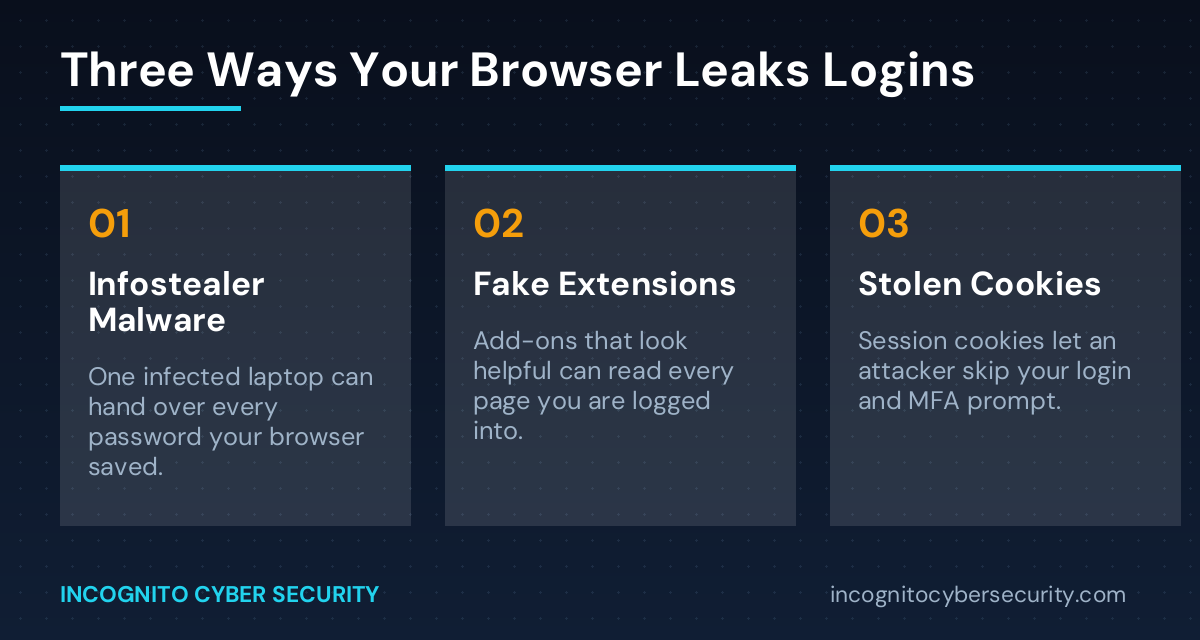
1. Infostealer malware
This is software whose only job is to copy your saved passwords, autofill data, and session cookies, then send them to a criminal marketplace. It arrives in cracked software, fake browser update prompts, malicious ads, and “free” utilities. It does not encrypt anything or slow your machine down. You would never know it ran. That is the point.
2. Malicious browser extensions
Extensions are allowed to read the pages you are looking at — that is how a grammar checker or a coupon finder works. A dishonest one uses that same permission to read your webmail, your invoices, and your admin dashboards. Many of these start out genuinely useful, build a user base, then get sold or updated into something harmful months later.
3. Stolen session cookies
This is the one that surprises business owners. A session cookie is the little token that keeps you logged in so you are not typing your password forty times a day. If an attacker steals that token, they do not need your password or your multi-factor code — they just paste the token in and they are already inside your account. Multi-factor authentication is still essential, but it is not a force field.
What this actually costs a small business
The password itself is rarely the prize. Access is. Once someone is inside a business email account, they read quietly for a few weeks, learn who pays whom, and then send one very convincing invoice with new banking details. Or they use that same reused password on your remote access tool and bring in ransomware. The credential theft is step one; the expensive part comes later.
The other uncomfortable detail: most of these stolen logins come off devices you do not manage. A home computer. A spouse’s laptop. A personal phone with the work email on it. If your team can reach company systems from a machine you have never inventoried, that machine is part of your network whether you counted it or not.
What you can do this week
None of this requires a big budget. It requires deciding to do it.
- Stop letting the browser store business passwords. Open your browser settings, look at the saved password list, and clear the ones tied to banking, payroll, email, and accounting. Move them into a real password manager instead — that is what those tools are built to protect.
- Audit your extensions today. Remove anything you do not actively use or do not remember installing. If you cannot name what an extension does for you, it does not need to read your screen.
- Turn on multi-factor authentication everywhere it is offered — email first, then banking, then anything with customer data. It will not stop cookie theft, but it stops the large majority of plain password reuse attacks.
- Put real protection on the endpoints. Consumer antivirus does not reliably catch modern infostealers. This is what business-grade endpoint protection is for, and it should cover laptops that leave the office.
- Filter what reaches the inbox in the first place. A lot of this malware arrives as an attachment or a link, so spam and virus filtering removes a large share of the opportunity.
- Tell your team what to look for. Fifteen minutes of security awareness training on “don’t install free software on the machine you use for work” prevents more damage than most technology purchases.
- Make sure your backups are real and tested. If credential theft turns into something worse, secure data backups are the difference between a bad afternoon and a closed business.
The bottom line
Convenience is what built this problem. Every time someone clicked “Save password” to move a little faster, they added one more key to a cabinet with a weak lock. You do not have to make your team miserable to fix it — you just have to move the keys somewhere that was actually designed to hold them, and put decent protection on the machines that touch your business.
If you are not sure what is saved where, or which devices are reaching your email, that is a very normal place to be. It is also exactly the kind of thing worth spending an hour on before it becomes a wire transfer you cannot get back.
Not sure what your browsers are holding onto?
We will walk your business through a straightforward review of saved credentials, extensions, and endpoint coverage — and tell you plainly what needs attention.
You can also read more about our small business cyber security solutions, or browse the rest of the Incognito blog for more plain-English guidance.
Send us a message
Questions about anything in this article? Send them over and I will answer personally.
— Nemuel Cruz, Incognito Cyber Security