When AI Gives You a Scammer’s Phone Number Instead of Real Support
Last week I watched a client type “how do I contact my bank’s fraud department” into an AI search tool. The answer that came back looked perfect — a clean summary, a phone number, a case number format to have ready. Only the number wasn’t the bank’s. It belonged to a scammer who had spent months making sure AI tools would find it first.
This isn’t a hypothetical. Security researchers just documented an active campaign where attackers flood the web with fake support pages, reviews, and PDFs built specifically to get picked up by ChatGPT, Google AI Overviews, Gemini, and Perplexity. Airlines, banks, and travel sites like Delta, Chase, Bank of America, and Airbnb have all had fake support numbers surface in AI answers. Nobody’s proven small businesses are being targeted the same way yet — but the technique doesn’t care what size company it’s impersonating, and your customers are using the same AI tools your bank’s customers are.
How “AI search poisoning” actually works
Search engines used to rank pages based on links and reputation, which made them hard to game overnight. AI chatbots work differently — they summarize whatever content looks most relevant and authoritative in the moment, pulled from a much wider, faster-moving pool of sources.
The attacker’s playbook
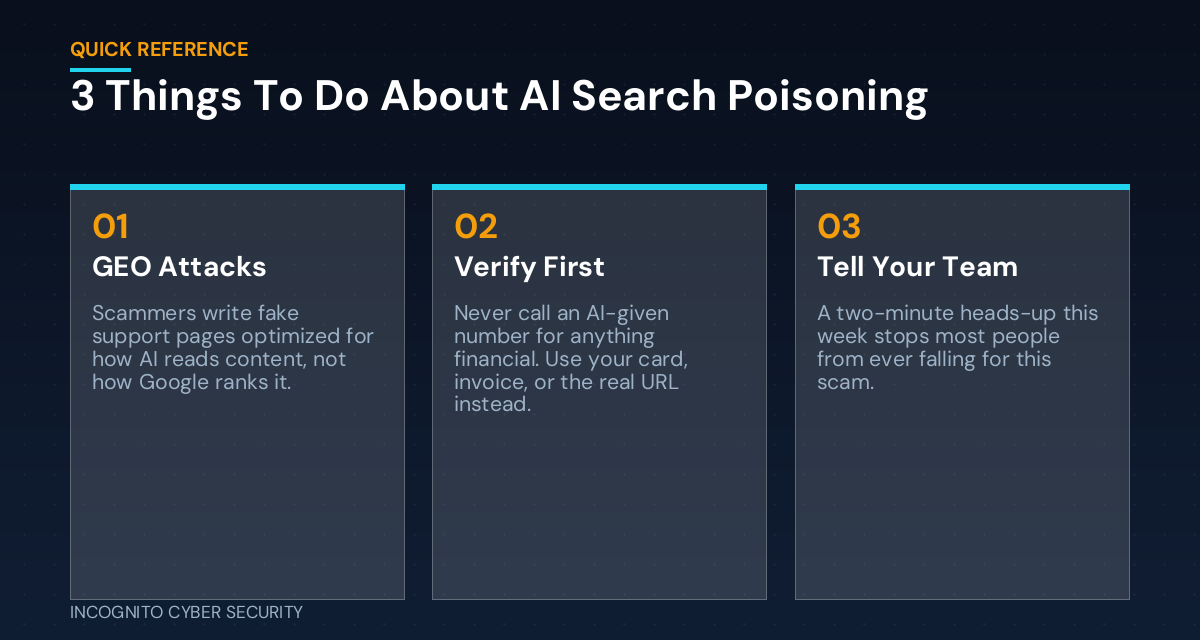
Researchers call this technique GEO — Generative Engine Optimization — the AI-era cousin of old-school SEO spam. Instead of chasing Google rankings, attackers write content specifically for how AI reads it: exact phrasing a customer would type (“Delta customer service phone number”), question-and-answer formatting, and the fake number repeated several times for emphasis. They post it everywhere at once — Yelp reviews, Google Sites pages, GitHub Pages, Blogger, YouTube descriptions, even compromised university and government websites — so at least a few copies get indexed and surfaced.
Why it works so well
When an AI tool gives you a confident, well-formatted answer, it doesn’t come with a link you can hover over or a URL you can eyeball for typos, the way a Google search result does. You’re trusting the AI’s summary at face value. That’s exactly the trust the scam is built to exploit — and it’s the same reason we’ve been warning clients about fake login pages that look real.
Why this matters even if you’re not Chase or Delta
Two risks stack up here for a small business owner. First, your own staff searches for vendor and bank support numbers constantly — payroll processor, insurance carrier, software vendor, merchant services. If any of those searches ever routes through a scam number, someone on your team could hand over account credentials or a one-time passcode believing they’re talking to a legitimate support line. That’s how a lot of credential theft actually starts — not a dramatic hack, but a normal-feeling phone call.
Second, if your own business’s name and support contact ever get impersonated this way, a customer could end up giving their card or account information to someone pretending to be you. That’s a reputation problem you won’t see coming until a customer calls you confused about a charge you never made.
What you can do this week
- Stop trusting AI-provided phone numbers for anything financial. Get the number from the back of your card, the vendor’s invoice, or by typing the company’s actual URL into your browser — not from a chatbot summary.
- Tell your team, in plain language, this week. A two-minute heads-up in your next huddle does more than a policy nobody reads. If it sounds unfamiliar, our cybersecurity awareness training covers exactly this kind of scam in language your staff will actually remember.
- Search your own business name plus “phone number” or “customer service” in ChatGPT, Gemini, and a couple of others. If anything looks off, you want to know before a customer does.
- Bookmark your real vendor support pages — bank, payroll, insurance, key software — so nobody on your team has to search for them under pressure.
- Make sure endpoint protection is actually watching for the next step of this scam — remote-access tools and credential-stealing malware that a “support agent” talks a victim into installing. That’s exactly what endpoint protection is built to catch.
The bottom line
AI tools are genuinely useful, and I’m not telling you or your team to stop using them. But treat an AI-generated phone number or contact link the way you’d treat an unfamiliar name on caller ID: helpful as a starting point, not something to act on without a second check. The businesses that get burned by this aren’t careless — they’re just busy, and busy is exactly what this scam is counting on.
If you want a second set of eyes on how your team handles this kind of thing — or whether your current spam and phishing filtering and backup protection would catch what comes after a scam like this succeeds — that’s exactly what our small business cybersecurity solutions are built for. We work with small business owners across Southern Arizona on exactly this kind of thing every day.
You can find more plain-English breakdowns like this one on our blog.
Not sure if your team would catch a scam like this?
Get a free, no-pressure look at your current setup — endpoint protection, backups, spam filtering, and how your team handles the unexpected call.
Send us a message
Questions about this or anything else in your security setup? Send us a note and we’ll get back to you.
— Nemuel Cruz, Incognito Cyber Security