A Stolen Login Gets Handed Off in 22 Seconds: Is Your MFA Strong Enough?
Picture this: an employee’s password leaks on a Tuesday. By the time you finish your coffee, a different criminal gang already owns the keys to your email. Not days later. Seconds later. That is the world small businesses are working in right now, and October, Cybersecurity Awareness Month, is a good time to look at it honestly.
Hackers do not break in anymore. They log in.
A recent Forbes piece on small business security pulled together some numbers that stuck with me. Google’s Mandiant team found that the time between an attacker getting initial access and handing it to a second criminal group dropped to just 22 seconds in 2025. In 2022, that handoff took about eight hours. Think of it like a relay race where the baton is your stolen password, and the runners have gotten very, very fast.
The same article cites Verizon’s 2026 data: 96% of ransomware victims are small and midsize businesses, and in 38% of those cases the attackers had compromised credentials. In plain English, they did not smash a window. They used a key.
Why your current MFA might not be enough
You probably already use multi-factor authentication, or MFA: the text code or the “Approve this sign-in?” tap on your phone. Good. Keep it. The Forbes article notes that modern MFA cuts the risk of identity compromise by more than 99%. But “modern” is the key word. Criminals have learned to work around the weak versions:
- Push bombing: they spam your employee with approval requests at 11 p.m. until one tired thumb taps “Approve.”
- Fake login pages: the employee types the password and the code into a convincing copy of the real site, and the criminal uses both instantly. I covered a version of this in my post on device-code phishing.
- Text-message codes: these can be tricked out of people or intercepted.
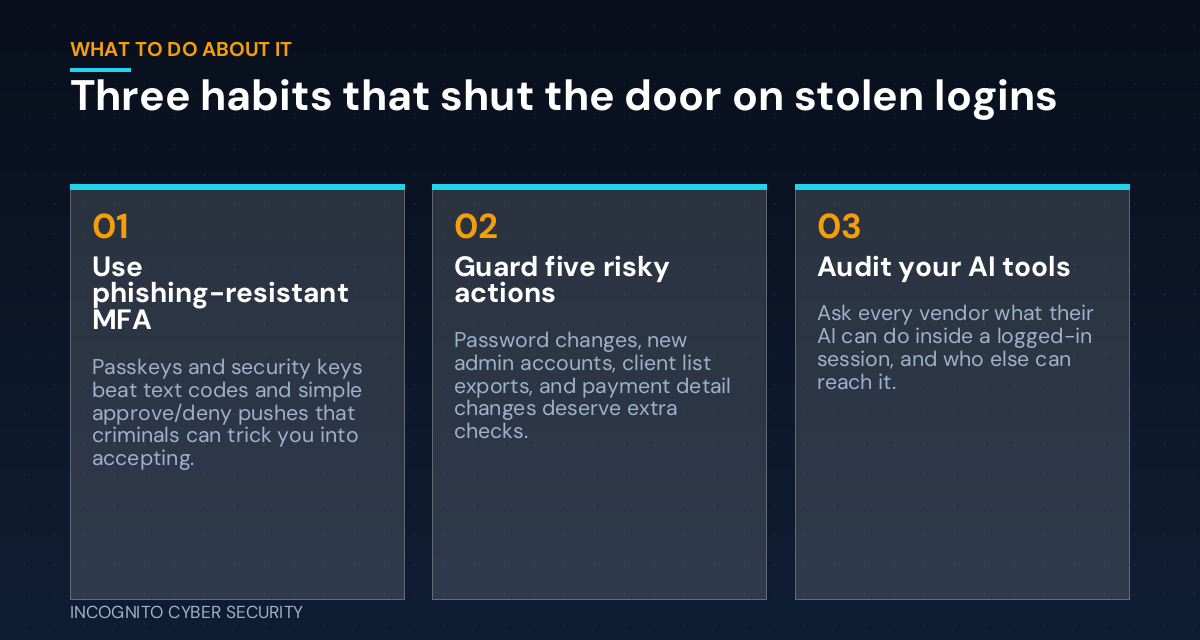
The stronger option is called phishing-resistant MFA: passkeys or physical security keys. They only work on the real website, so there is nothing for a fake page to steal. It is the difference between a code someone can read over your shoulder and a key that only fits one lock.
Protect the moments that matter most
You cannot watch every click your team makes, and you should not try. Instead, the article suggests picking a short list of actions where a stranger doing them would cost you real money. For most small offices that list looks like this:
- Changing a password or recovery email
- Adding a new administrator
- Exporting your client list
- Changing payment or bank details
- Creating forwarding rules on a mailbox
For those five, ask for an extra check, such as a fresh sign-in or a call-back to a known phone number, instead of nagging people about every little thing. Too many prompts and people learn to click through them all.
Do not forget your AI tools
Many businesses added AI assistants this year, and some of those tools act inside logged-in sessions: reading email, opening files, filling in forms. The article’s advice is blunt. Review every AI tool you have turned on, and ask each vendor what it can do inside a signed-in session and who else can reach it. If nobody can answer, that is your answer.
What you can do this week
- Turn on MFA everywhere. Start with email, banking, payroll, and your accounting software.
- Switch your owner and admin accounts to passkeys or security keys. Those are the accounts criminals want most.
- Turn on number matching if your app offers it, so a blind “Approve” tap does not work.
- Write down your five risky actions and decide what extra check each one needs.
- List your AI tools and ask vendors who can see inside a signed-in session.
- Tighten your email defenses. Good spam and virus filtering stops many credential-stealing emails before anyone sees them.
- Train your team in 15 minutes. Our cybersecurity awareness training teaches people to report an odd approval request instead of tapping it.
The bottom line
You cannot stop every password from leaking. You can make a stolen password useless. Strong MFA, a short list of guarded actions, and a few honest questions to your software vendors will do more than any fancy monitoring tool. If you want help sorting out where you stand, our small business cyber security solutions and endpoint protection cover this, and you can find more plain-English tips on our blog.
Not sure how strong your logins really are?
We will review how your team signs in, find the weak spots, and give you a simple plan to fix them. No pressure, no jargon.
Send us a message
Source: Forbes: Small Business Security Now Depends On What Happens After Login (Mandiant and Verizon figures as cited there).
— Nemuel Cruz, Incognito Cyber Security